
Accela Citizen Access Portal – Mobiles
The Accela Citizen Access Portal is the Warren County Health District’s online permitting system which allows members of the public and regulated community to submit plans and applications for new and existing restaurants, grocery stores and food marts, food trucks, temporary food establishments, vending machines, and micromarkets.
Access the Accela Citizen Access Portal
How to submit plans and applications to the Accela Citizen Access Portal
- Click the link for Accela Citizen Access Portal
- Create an account
- Select Environmental Health at the top
- Select Create an Application
- Read the disclaimer and click the box at the bottom confirming you have read and accepted it
- Select Continue Application
- Select the Record Type and select Continue Application
- Complete the Application
- Equipment List and Interior Finish can be added to documents (see helpful tips and tricks below for more information)
Helpful Tips and Tricks for Submitting to the Accela Citizen Access Portal
Tip#1 Plan Ahead!
The Warren County Health District asks for 30 days to act on submitted plan review applications for new food facilities. The inspector assigned to your plan review has hundreds of food facilities, and dozens of pools, campgrounds, and other inspections they are responsible for completing. Getting your plan review submitted to our office sooner rather than later ensures that your plan review process is finished quickly and will help keep you on schedule.
Tip#2 Prepare Your Documentation!
Mobiles are required to submit the following attachments, these are not all required by the Accela Citizen Access Portal at the time of submission, but the WCHD does require the following documents:
- WCHD Accela Supplemental Mobile Packet (LINK)
- Floor Plan (including plumbing fixtures)
- Proposed Menu
- Equipment List
- Lighting Schedule
- Auxiliary structures or vehicles (such as refrigerated trucks)
- Name and Address of Commissary or Licensed Food Facility (shared use kitchen)
- Shared kitchen Agreement (LINK)
- Vomit and Diarrhea Cleanup procedures (LINK)
- Employee Health Agreement (LINK)
- Person-in-charge (food handler) certification in food safety (High Risk Mobiles)
Tip#4 Step 3- Business Information!
When submitting the equipment list and interior finish section of Step 3- Business Information please do not input each piece of equipment or the finish schedule manually. In Figure 1. below, you can see the “Add a Row” option that allows you to a row and input each individual piece of equipment / interior finish. This is NOT required by the WCHD. The Accela Citizen Access Portal requires at least 1 row added to each of these sections to move to the next steps. For your convenience, please add only 1 row to the Equipment List and 1 row to the Interior Finishes section. Then you may upload the complete Equipment List and Interior Finishes to Section 4- Documents.
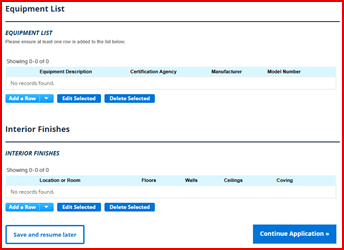
Figure 1. Step 3- Business Information – Equipment list and Interior Finish Schedule